
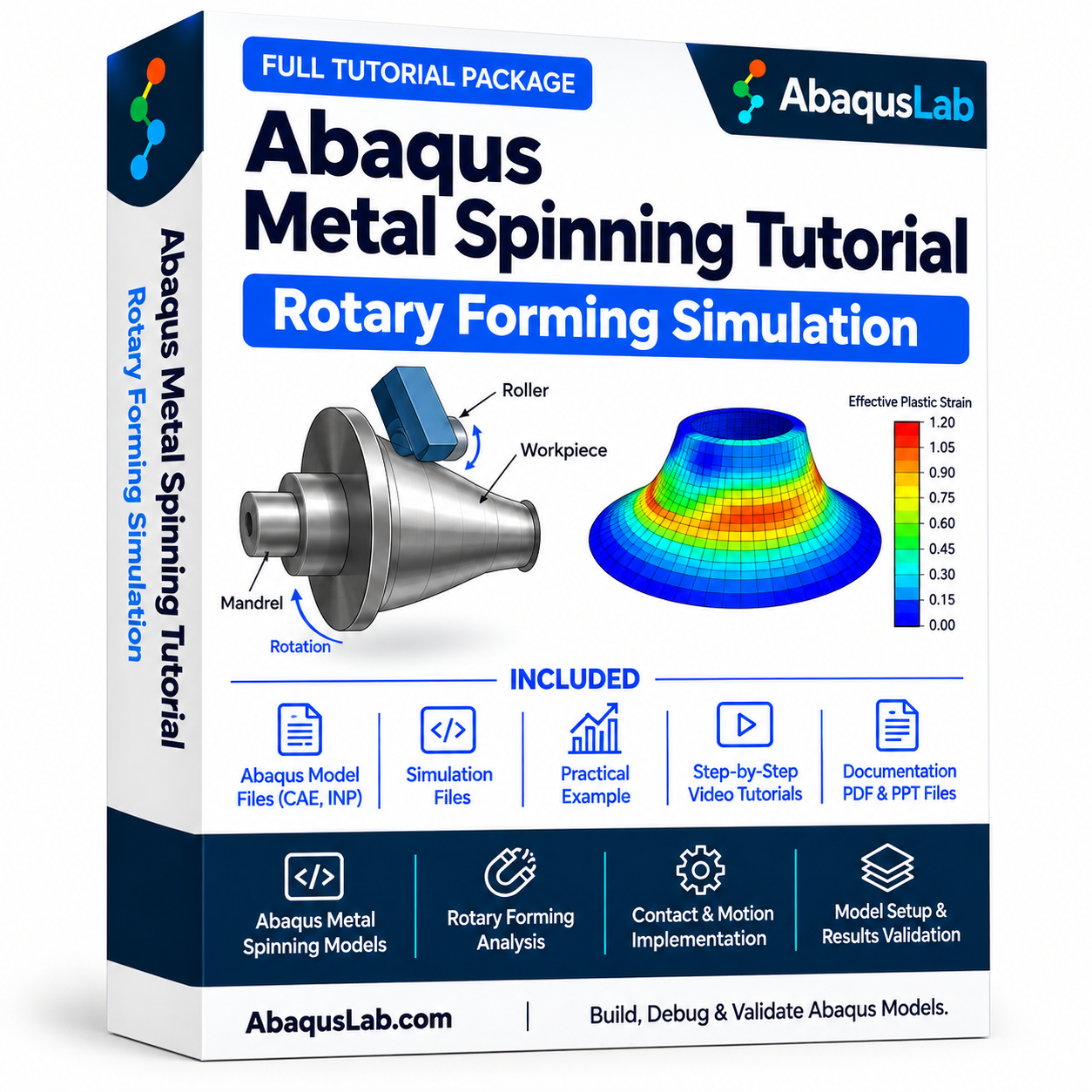
Description
Abaqus Metal Spinning Tutorial | Rotary Forming Simulation
This Abaqus Metal Spinning tutorial introduces the numerical modeling of rotational sheet-metal forming using finite element analysis. Learn how a Metal Spinning Simulation represents a rotating blank and a forming roller, follow an Abaqus Metal Spinning Tutorial workflow for contact and material deformation, and explore Abaqus Rotary Forming through tool motion, workpiece constraints, and post-processing. The Abaqus Metal Forming Simulation approach helps engineers evaluate forming forces, stress, plastic strain, thickness change, and the final component profile. Specific solver settings and included files should be confirmed against the actual tutorial package.
What Is Abaqus Metal Spinning? — Metal Spinning Simulation and Rotary Forming Explained
Abaqus Metal Spinning is a finite element approach for studying how a metal blank is progressively shaped by a roller while the workpiece rotates, usually against a mandrel or supporting tool. A Metal Spinning Simulation models the interaction between the blank, roller, and support to predict local deformation and forming loads. An Abaqus Metal Spinning Tutorial guides the setup of geometry, materials, contact, motion, and result evaluation. Abaqus Rotary Forming describes the rotational forming mechanism, while Abaqus Metal Forming Simulation is the broader category of finite element analyses for plastic metal shaping. These models can use explicit dynamics for complex contact, but the actual solver must match the example supplied.
What Is Abaqus Metal Spinning?
Abaqus Metal Spinning represents the incremental forming of a rotating metal workpiece by one or more rollers. The finite element model tracks how localized contact causes plastic flow and changes the part geometry.
How Does a Metal Spinning Simulation Work?
A Metal Spinning Simulation defines a blank, roller, and any mandrel or fixture, then imposes appropriate rotational and feed motion. Contact forces drive deformation, while output variables reveal the evolving shape and stress–strain response.
What Does an Abaqus Metal Spinning Tutorial Teach?
An Abaqus Metal Spinning Tutorial typically explains geometry preparation, material plasticity, tool kinematics, contact, mesh selection, job execution, and results interpretation. Exact downloadable assets depend on the purchased package.
What Is Abaqus Rotary Forming?
Abaqus Rotary Forming refers to numerical modeling of processes in which rotation and tool contact progressively shape a workpiece. Metal spinning is one example; other rotary processes may require different toolpaths and material models.
Which Solver Is Used for Abaqus Metal Forming Simulation?
Abaqus Metal Forming Simulation can use Abaqus/Explicit when severe contact and large plastic deformation make an explicit formulation useful. A quasi-static process must still be checked for excessive inertia and artificial energy; solver selection is model-specific.
How Are Roller Contact and Tool Motion Defined?
The roller and mandrel may be modeled as rigid or deformable bodies as appropriate. Relative rotation, axial or radial roller feed, friction, and contact constraints must be specified consistently with the physical process.
What Results Can Be Extracted from Metal Spinning Simulation?
Common results include roller reaction force, displacement, equivalent plastic strain, von Mises stress, thickness distribution, contact pressure, and final geometry. Results should be compared with available experiments or trusted reference data.
Who Is the Abaqus Metal Spinning Tutorial For?
The tutorial is relevant to manufacturing engineers, Abaqus users, researchers, and students studying sheet-metal forming, rotary forming, contact mechanics, and nonlinear finite element simulation.
Abaqus Metal Spinning — Governing Equations and Modeling Concepts
The following eight cards provide general engineering relationships used to understand a Metal Spinning Simulation. They are explanatory expressions rather than verified transcriptions of the source tutorial. Material constitutive laws, contact algorithms, and tool kinematics must be chosen for the actual Abaqus Rotary Forming model.
1. Finite Element Dynamic Equilibrium
A dynamic finite element formulation balances inertia, internal forces, and applied forces.
2. Equivalent Plastic Strain
Equivalent plastic strain is a useful scalar measure of accumulated plastic deformation.
3. Von Mises Equivalent Stress
For isotropic J2 plasticity, the deviatoric stress determines the equivalent stress.
4. Yield Condition
A simple isotropic plasticity model compares equivalent stress with the current flow stress.
5. Contact Friction
A Coulomb friction approximation relates limiting tangential traction to normal contact pressure.
6. Rotational Kinematics
The circumferential velocity of a point at radius r depends on angular speed.
7. Thickness Reduction
Relative thickness reduction compares the initial and formed sheet thickness.
8. Forming Force Verification
The computed roller reaction may be compared with measured or reference forces.
What You Receive with This Abaqus Metal Spinning Tutorial
This standalone Abaqus Metal Spinning Tutorial learning package focuses on Abaqus Metal Spinning, roller-driven deformation, contact modeling, and Abaqus Rotary Forming workflows. Learn how to develop a Metal Spinning Simulation, configure an Abaqus Metal Forming Simulation, and evaluate plastic deformation, stress distribution, and final workpiece geometry.
Abaqus Metal Spinning Tutorial Videos
Abaqus Metal Spinning Models, Simulation Files & Materials
What Does the Abaqus Metal Spinning Tutorial Cover?
The Abaqus Metal Spinning workflow focuses on rotational forming geometry, contact and tool motion, nonlinear material response, and numerical results. The topics below describe a comprehensive Abaqus Metal Forming Simulation learning framework; verify individual lessons against the finished package before publication.
Metal Spinning Fundamentals
Physical forming process and progressive roller contact
Blank and Mandrel Geometry
Workpiece dimensions, mandrel shape and tool positioning
Roller Definition
Rigid or deformable roller representation and reference points
Material Plasticity
Elastic-plastic properties and hardening assumptions
Rotational Motion
Angular velocity and workpiece rotation
Roller Feed Path
Axial and radial tool movement and process stages
Contact and Friction
Surface interaction and roller–blank contact
Mesh Strategy
Local resolution, element selection and distortion checks
Analysis Procedure
Appropriate nonlinear solution strategy and time stepping
Reaction Force
Roller forces and loading history
Thickness and Strain
Wall thinning, equivalent plastic strain and stress
Validation
Geometry, energy, mesh and reference comparisons
Abaqus Metal Spinning — Complete Standalone Learning Workflow
Metal Spinning Simulation — Verification and Troubleshooting
A reliable Metal Spinning Simulation requires more than a completed solver run. Check tool motion, contact behavior, plastic strain, and energy balance to determine whether the predicted forming response is physically meaningful.
What You Will Learn with Abaqus Rotary Forming
Create the Model
Assemble the blank, mandrel and roller geometry
Apply Tool Motion
Set rotation and roller feed conditions
Define Contact
Configure friction and interaction behavior
Model Plasticity
Capture permanent deformation of the blank
Run the Analysis
Inspect numerical stability and solver messages
Interpret Forming Forces
Review tool reaction and contact response
Assess Thickness Change
Study local thinning and shape accuracy
Verify Results
Evaluate mesh, energies and reference comparisons
What You Receive with the Abaqus Metal Spinning Tutorial
The intended package is a practical learning resource for Abaqus Metal Spinning and Abaqus Rotary Forming. Before publishing the product, confirm the final video lessons, Abaqus CAE/input files, documentation, and any additional files actually included.
Step-by-Step Technical Learning
A structured explanation of geometry, forming tools, contact, material behavior, simulation and post-processing.
Model and Supporting Materials
Abaqus model/input files and supporting tutorial materials, subject to verification of the final downloadable package.
Who Is This Abaqus Metal Spinning Tutorial For?
- Manufacturing engineers developing rotary sheet-metal forming processes
- Abaqus users studying nonlinear contact and plastic deformation
- Researchers analyzing spinning forces, thickness and forming accuracy
- MSc and PhD students working on metal forming simulations
- Engineers evaluating roller toolpaths and material response
Need Custom Abaqus Metal Forming Simulation Support?
Custom Abaqus Metal Forming Simulation projects may involve specialized roller paths, anisotropic material models, process optimization, experimental correlation, or numerical troubleshooting. Contact AbaqusLab to discuss the scope of a rotary forming analysis.
Abaqus Metal Spinning Tutorial — Frequently Asked Questions
What is Abaqus Metal Spinning?
It is the finite element simulation of progressive forming of a rotating metal workpiece by a roller, typically against a mandrel.
What is a Metal Spinning Simulation?
It is a numerical model that represents roller motion, workpiece rotation, material plasticity and contact to predict forming response.
Does this Abaqus Metal Spinning Tutorial use Abaqus/Explicit?
Abaqus/Explicit is commonly suitable for complex contact and large deformation. The specific solver used by this product must be verified against its actual files.
What is Abaqus Rotary Forming?
It is the numerical modeling of forming processes driven by rotating workpieces or tools, including conventional metal spinning.
What does Abaqus Metal Forming Simulation predict?
Typical outputs include stress, plastic strain, contact pressure, roller force, wall thickness and final geometry.
How do I define roller motion?
Specify a physically consistent rotational and feed path, together with suitable reference points and boundary conditions.
Why is contact important in metal spinning?
The roller applies local forming forces through contact; friction and contact constraints strongly affect the resulting force and deformation.
How do I check wall thinning?
Compare the final sheet thickness with the initial thickness along the formed profile and inspect the local strain distribution.
Is the tutorial part of a series?
No. This is a standalone Abaqus Metal Spinning tutorial.
How can I validate the simulation?
Compare tool force, final geometry, thickness and strain with available experiments or reference models, and perform mesh and energy checks.
Related Abaqus Metal Forming and Automation Resources
This standalone Abaqus Metal Spinning Tutorial complements other AbaqusLab resources on nonlinear material behavior and automated finite element modeling. These are related learning topics rather than required parts of a metal-spinning bundle.
SUPPORT & AUTOMATION
TECHNICAL REFERENCE
Consult the official Abaqus documentation for contact, material plasticity, and explicit dynamics, and use validated metal-spinning experiments or publications when assessing a particular forming process.


Reviews
There are no reviews yet.