


Description
Abaqus T-Frame Structure Tutorial | Screw & Fastener Modeling
This Abaqus T-Frame Structure tutorial provides a practical Abaqus T Frame Tutorial for building and analyzing a connected structural assembly in Abaqus. Learn Abaqus Screw Connection setup, Abaqus Fastener Modeling, and Abaqus Frame Connection behavior through geometry creation, material assignment, assembly interactions, loading, meshing, and results interpretation. The workflow introduces Abaqus Structural Analysis of T-shaped frame structures and establishes the prerequisite foundation for Part 2 — Abaqus H-Frame Structure Tutorial.
What Is Abaqus T-Frame Structure Modeling and How Does Screw & Fastener Analysis Work?
Abaqus T-Frame Structure modeling is finite element analysis of a T-shaped structural assembly whose members are joined through mechanical connections. An Abaqus T Frame Tutorial typically demonstrates how to define component geometry, assemble structural parts, apply materials and sections, represent screw or fastener behavior, impose loads and supports, and evaluate deformation and stress. In this tutorial, Abaqus Structural Analysis provides the overall framework while Abaqus Fastener Modeling and Abaqus Frame Connection definitions govern how loads transfer between joined members.
What Is an Abaqus T Frame Tutorial Used For?
An Abaqus T Frame Tutorial is used to learn the complete finite element workflow for a T-shaped structural assembly, including member interaction, connection stiffness, support conditions, and stress or displacement results. It is an introductory building block for more complex connected frame systems.
How Is an Abaqus Screw Connection Represented?
An Abaqus Screw Connection may be represented using simplified fastener constraints or a more detailed connector or solid-bolt model, depending on the required accuracy and the actual model. The representation should reflect load transfer, permitted relative motion, and the intended screw behavior; do not assume detailed threads or preload are included.
What Does Abaqus Fastener Modeling Include?
Abaqus Fastener Modeling covers selecting connection locations, assigning suitable fastener behavior, connecting the intended structural regions, and checking the resulting load path. Fastener definitions must be consistent with the member geometry, mesh, and solver settings.
How Does Abaqus Frame Connection Analysis Transfer Loads?
An Abaqus Frame Connection transfers force and possibly moment between members according to its connection formulation. Joint stiffness, local constraints, contact assumptions, and fastener placement influence frame deformation and local stress concentrations.
Which Abaqus Structural Analysis Results Matter Most?
For Abaqus Structural Analysis, useful outputs include displacement, von Mises stress, connection forces or reactions when available, and regions of stress concentration. Results should be checked for realistic boundary conditions, mesh sensitivity, and connection behavior.
What Is the Difference Between T-Frame and H-Frame Tutorials?
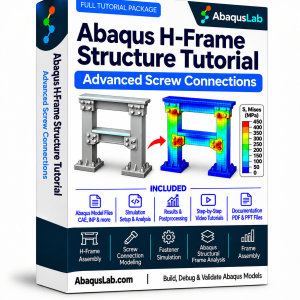
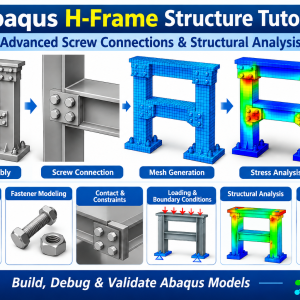
The Abaqus T-Frame Structure tutorial introduces the fundamental structural assembly and screw/fastener workflow. Part 2 applies those skills to an Abaqus H-Frame Structure with a more complex frame arrangement. Part 1 is the prerequisite for Part 2; the separate bolt connection tutorial does not require either frame course.
What Does the Abaqus T-Frame Structure Tutorial Cover?
This Abaqus T Frame Tutorial introduces the workflow for Abaqus Frame Connection analysis, with practical attention to Abaqus Screw Connection representation, Abaqus Fastener Modeling, and overall Abaqus Structural Analysis.
T-Frame Geometry
Create and organize the structural members.
Abaqus Frame Connection
Identify joined regions and load paths.
Abaqus Screw Connection
Understand screw-based connection idealizations.
Abaqus Fastener Modeling
Define locations and fastener behavior.
Assembly Setup
Position and align connected components.
Material and Section Properties
Assign structural material behavior.
Contact and Constraints
Control interaction between joined members.
Loading and Supports
Apply realistic structural boundary conditions.
Mesh Generation
Mesh the frame and joint regions.
Abaqus Structural Analysis
Run the finite element model and assess behavior.
Stress and Displacement
Interpret contours and deformation.
Model Verification
Check reactions, connections, and mesh sensitivity.
Abaqus Bolted Connections & Frame Structures Learning Path — Parts 1–3
The AbaqusLab series starts with Abaqus T-Frame Structure and advances to Abaqus H-Frame Structure. Part 1 → Part 2 is the required frame-learning sequence. Abaqus Bolt Connection is a standalone tutorial that can be studied independently. The complete suite brings all three products together.
Part 1 — T-Frame Structure
- ⚙️ T-frame geometry and assembly
- 🔩 Screw and fastener modeling
- 📐 Structural loads and constraints
- 🔍 Stress and displacement results
Part 2 — H-Frame Structure
- ⚙️ H-frame structural assembly
- 🔩 Advanced screw connections
- 📐 Frame interactions and loading
- 🔍 Structural response interpretation
Part 3 — Bolt Connection
- 🔩 Bolted joint modeling
- ⚙️ Connection interactions
- 📐 Loading and joint behavior
- 🔍 Bolt and plate response
Abaqus Bolted Connections & Frame Structures — Parts 1–3
- T-Frame Structure — Part 1
- H-Frame Structure — Part 2
- Bolt Connection — Part 3
- Screw and fastener modeling
- Structural connection analysis
- Combined learning resources
Prices above are proposed and should be updated to your finalized WooCommerce prices before publication. Product links are proposed slugs and should be checked after publication.
What You Receive with This Abaqus T-Frame Structure Tutorial
The Abaqus T-Frame Structure learning package is designed to help you understand and reproduce Abaqus Screw Connection and Abaqus Fastener Modeling workflows within a practical structural assembly. Confirm the exact downloadable formats and support terms against the final product package before publishing.
T-Frame Structure Modeling Tutorial Videos
Abaqus Models & Supporting Materials
Abaqus T-Frame Structure Tutorial — Learning Sequence
Abaqus Structural Analysis — T-Frame Connection Verification Workflow
What You Will Learn with the Abaqus T-Frame Structure Tutorial
T-Frame Geometry
Create and organize the structural members.
Abaqus Frame Connection
Identify joined regions and load paths.
Abaqus Screw Connection
Understand screw-based connection idealizations.
Abaqus Fastener Modeling
Define locations and fastener behavior.
Assembly Setup
Position and align connected components.
Material and Section Properties
Assign structural material behavior.
Contact and Constraints
Control interaction between joined members.
Loading and Supports
Apply realistic structural boundary conditions.
Who Is This Abaqus T Frame Tutorial For?
- Structural engineers learning Abaqus frame assembly modeling
- Mechanical engineers analyzing screw and fastener connections
- FEA analysts studying structural connection behavior
- Students preparing for advanced H-frame simulation
- Researchers evaluating joined frame response
- Engineers learning practical Abaqus Structural Analysis
Need Custom Abaqus Frame Connection or Fastener Modeling?
Custom Abaqus Frame Connection projects may require specialized fastener idealizations, contact definitions, structural loads, or experimental correlation. AbaqusLab consulting can help adapt the general Abaqus T-Frame Structure workflow to a particular engineering assembly.
Abaqus T-Frame Structure — Frequently Asked Questions
What is Abaqus T-Frame Structure modeling?
It is finite element modeling of a T-shaped structural assembly, including its members, connections, supports, loads, and structural response.
What is included in an Abaqus T Frame Tutorial?
The learning workflow covers assembly setup, materials, screw/fastener connections, constraints, meshing, analysis, and stress/displacement results.
Does the tutorial cover Abaqus Screw Connection modeling?
Yes, screw and fastener connection modeling is a central topic. The exact connection formulation should be checked in the supplied Abaqus files.
What is Abaqus Fastener Modeling?
It is the representation of mechanical fasteners and their load-transfer behavior in a finite element assembly, using an appropriate idealization.
What is an Abaqus Frame Connection?
A frame connection joins structural members and governs how forces, moments, and relative motion transfer across the joint.
Does this tutorial include detailed screw threads or bolt pretension?
The supplied source information does not establish that detailed threads or bolt pretension are covered. Do not assume these features are included.
Is Part 1 required before the H-frame tutorial?
Yes. The T-frame tutorial is the prerequisite for Part 2 — Abaqus H-Frame Structure Tutorial.
Do I need Part 1 for the bolt connection tutorial?
No. Part 3 — Abaqus Bolt Connection Tutorial is standalone.
Which results should I check in Abaqus Structural Analysis?
Check displacements, stresses, reactions, and connection response, along with mesh quality and constraint consistency.
Related Abaqus Frame Structure, Fastener & Structural Analysis Resources
Continue from the Abaqus T-Frame Structure to H-frame assembly, independent bolt connection modeling, and related Abaqus structural analysis workflows. The links below support navigation between the connected learning paths.
3. OTHER ABAQUS MODELING RESOURCES
4. CONSULTING & SUPPORT
5. EXTERNAL RESOURCES & DOCUMENTATION
Consult official Abaqus documentation for fastener, connector, contact, and structural analysis capabilities, and verify all model-specific settings in your supplied files.
Reviews
There are no reviews yet.